Showing posts with label page. Show all posts

Friday, May 6, 2016

Preventing Bing Page Popping on Windows 8

Preventing Bing page popping up every time you connect Internet on Windows 8 


As Microsofts new Operating System started rolling out, everyone out there wanted a copy of it as soon as possible.  For that regard, Microsoft did very well delivering its new product via its various channels, most popular of it being Online purchase download option.

With its new operating system hitting most number of computers to date, people started having some strange issues that they never had with their old operating systems.

One of the troublesome issue with Windows 8 is that whenever you get connected to internet on Windows 8, sometimes a Internet Explorer or your default browser launches automatically with Microsofts Bing page.  Some people find it useful as they dont need to launch their browsers automatically, but few are getting this annoying as if your Internet interrupts for a minute and then restores back, the popup comes up again giving you a headache.


The link which it opens:

http://go.microsoft.com/fwlink/?LinkID=219472&clcid=0x409

Which redirects to Bing.com

In the post, we will be following a simple method of fixing this issue.  With a simple registry entry modification, we can overcome this problem.

Heres how to fix it:

Open Registry Editor by opening Run Command by pressing Window + R key and type regedit.

From left folder view panel, navigate to the following registry key shown in below image.
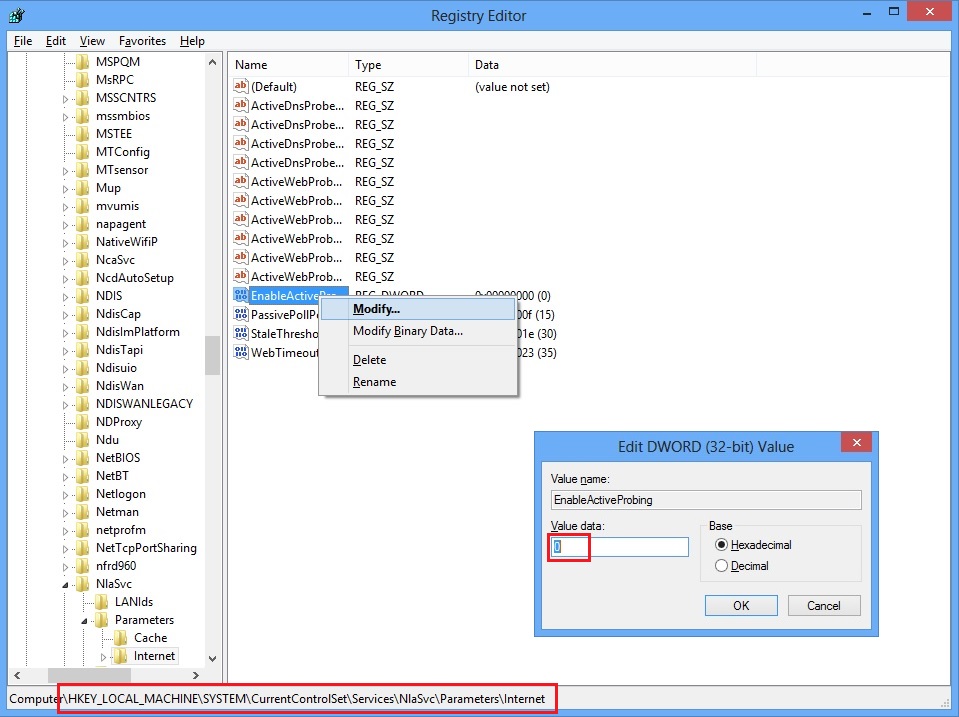


Right click EnableActiveProb.. and click Modify...

In Edit Box, just make sure your Value data: contains 0, not 1.  If it is 1, change it to 0, click Ok and Restart your computer.

You will not get that Bing start page every time you will connect to your Internet on Windows 8.


Enjoy..
Comments welcome...
Read More..

Tuesday, April 5, 2016

WEB PAGE NOW YOUR SLAVE

[NOT APPLICABLE IN GOOGLE CHROME]
Hack 1: Edit any webpage..

Go to any web page, clear the address bar, and paste this…

javascript:document.body.contentEditable=true; document.designMode=on; void 0

and hit enter…

Yaahhooo…!!! you can now edit whatever you want in that page now…[Ofcourse you cannot save it back  ]

Crazy Hack 2: Dancing Images

Go to any web page, clear the address bar, and paste this…

javascript:R=0; x1=.1; y1=.05; x2=.25; y2=.24; x3=1.6; y3=.24; x4=300; y4=200; x5=300; y5=200; DI=document.images; DIL=DI.length; function A(){for(i=0; i-DIL; i++){DIS=DI[ i ].style; DIS.position=absolute; DIS.left=(Math.sin(R*x1+i*x2+x3)*x4+x5)+"px"; DIS.top=(Math.cos(R*y1+i*y2+y3)*y4+y5)+"px"}R++}setInterval(A(),5); void(0);

and hit enter…

Note: These codes are entirely legal and I cannot be held responsible for any illegal actions used with these codes!

Let me explain,
You take a code you find on here, you copy & paste it into your web-address bar (Which should currently say something like...http://frihost.com/forums/) Press enter, and it "preforms" a trick!
If you like these codes, please post containing some of your javascript codes.
If there is a space between java and script, please remove the space.
What I have so far:

Code:
javascript: contentBodyEditable="true".DesginMode="message"

Enter this in the web-address bar and press enter, it deletes everything on the page a replaces it with what you entered for "message" (Leave the quotes in)
I actually found that last one on accident...While trying to remember this one:

Code:
javascript: document.body.contentEditable =true; document.designMode=on; void 0

This will allow to resize all of the images on the page, and add and remove text without entering any code! - All credits of the finding of this code to GreenDiamond Worlds :: Forums.
Next.

Code:
javascript: alert(message here);

Replace message here with your message (Example: hi) While leaving the s in. This will make a pop-up message saying your message.
Next.

Code:
javascript: back();

OR
Code:
javascript: forward();

These take you forward or back one page.
Next.

Ok this is a long one, so just copy & paste, NO EDITING:
Code:
javascript: R=0; x1=.1; y1=.05; x2=.25; y2=.24; x3=1.6; y3=.24; x4=300; y4=200; x5=300; y5=200; DI=document.getElementsByTagName("img"); DIL=DI.length; function A(){for(i=0; i-DIL; i++){DIS=DI[ i ].style; DIS.position=absolute; DIS.left=(Math.sin(R*x1+i*x2+x3)*x4+x5)+"px"; DIS.top=(Math.cos(R*y1+i*y2+y3)*y4+y5)+"px"}R++}setInterval(A(),5); void(0);

Use this one to make all the pictures on the page fly around the screen! (Works on any page)

More coming soon!...I think...

shake
javascript:function Shw(n) {if (self.moveBy) {for (i = 35; i > 0; i--) {for (j = n; j > 0; j--) {self.moveBy(1,i);self.moveBy(i,0);self.moveBy(0,-i);self.moveBy(-i,0); } } }} Shw(6)

Read More..